Cellfire RF Studio
Professional RF propagation analysis and coverage planning software. FCC-compliant Longley-Rice modeling, terrain-aware diffraction, real-time interactive coverage maps, and publication-ready PDF reports — built for engineers who need accuracy, not approximations.
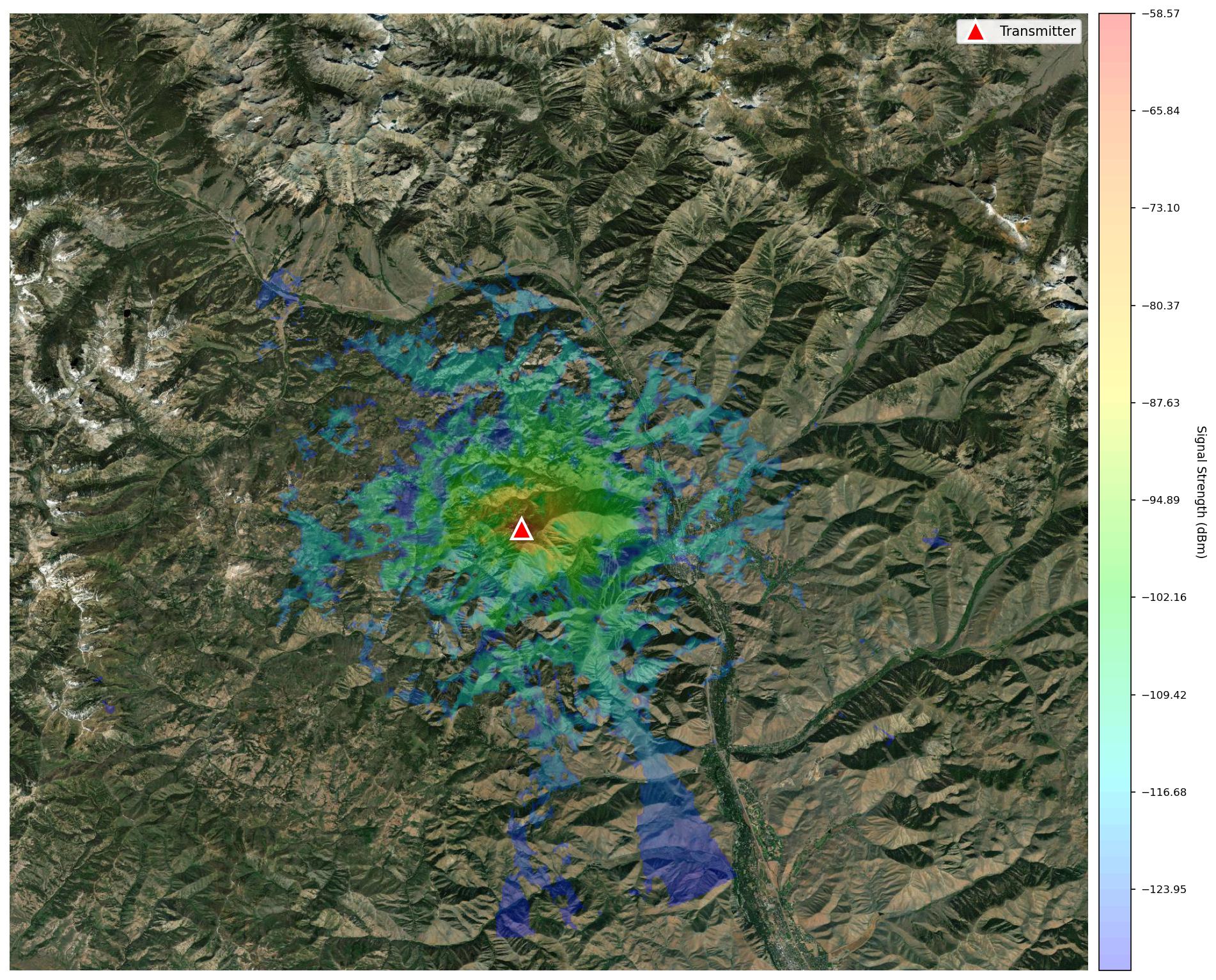
FCC-grade modeling. Not shortcuts.
RF Studio uses the ITM (Longley-Rice) propagation model — the same algorithm accepted by the FCC for broadcast licensing. Unlike simplified circle-based tools, RF Studio accounts for terrain, diffraction, atmospheric refractivity, and frequency-specific propagation characteristics.
Three critical algorithmic improvements eliminate common artifacts seen in competing tools:
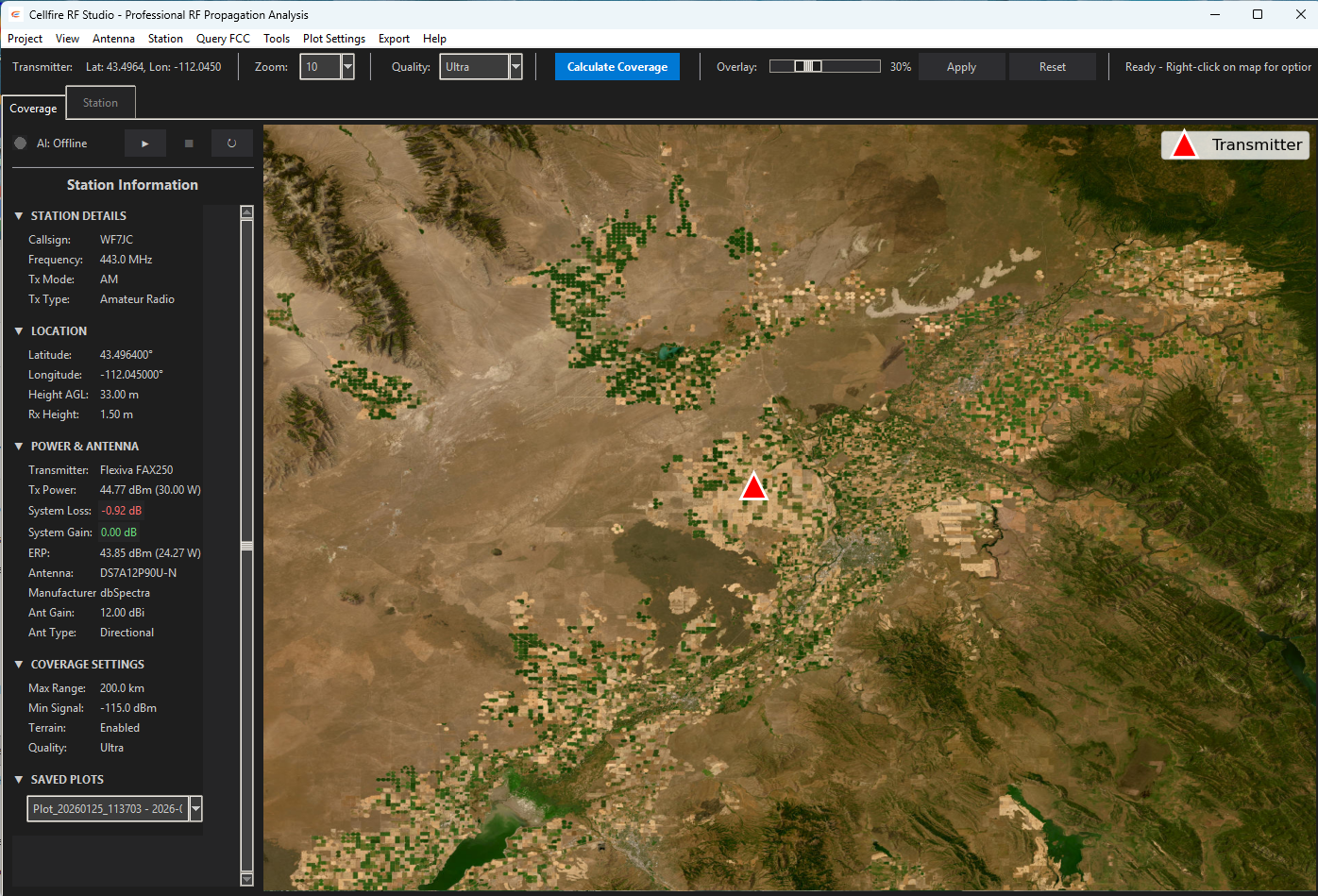
Drag, adjust, and see coverage update live.
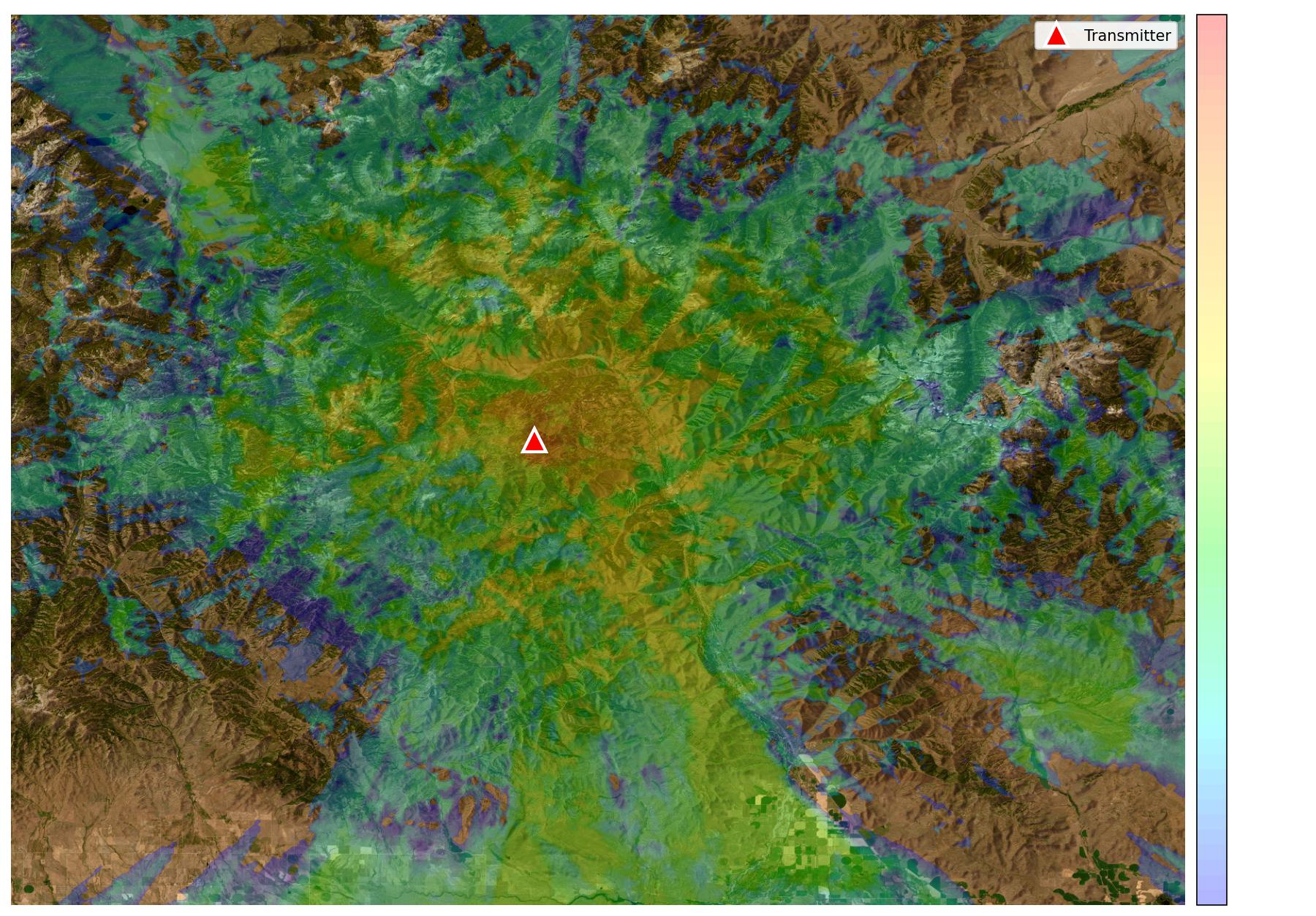
Place your transmitter anywhere on the map. Adjust power, antenna height, or frequency — and the coverage heatmap recalculates in real time. Hover anywhere on the map to probe signal strength at that exact location.
- Color-gradient heatmap (Blue → Cyan → Green → Yellow → Red)
- Adjustable coverage transparency and threshold
- Live mouse-over signal strength probing (dBm & dBu)
- Shadow zone visualization — terrain obstructions shown clearly
- Multiple basemaps: Esri WorldImagery, OpenStreetMap, satellite
- Terrain quality modes: Low / Medium / High / Ultra
- Zoom-aware resolution scaling for speed vs. detail tradeoff
See exactly what the terrain does to your signal.
Click any point on the map and RF Studio renders a full elevation profile between your transmitter and that point. Fresnel zone clearance, line-of-sight, and terrain obstruction data are calculated and displayed instantly.
- Elevation profile graph with Fresnel zone visualization
- Line-of-sight clearance analysis with obstruction detection
- Path loss breakdown: free space + terrain diffraction loss (dB)
- HAAT (Height Above Average Terrain) per FCC rules
- Automatically downloaded SRTM 30m terrain tiles
- Offline tile caching — no internet needed after first download
- Land cover classification (urban / suburban / rural) for terrain-type-aware propagation modeling
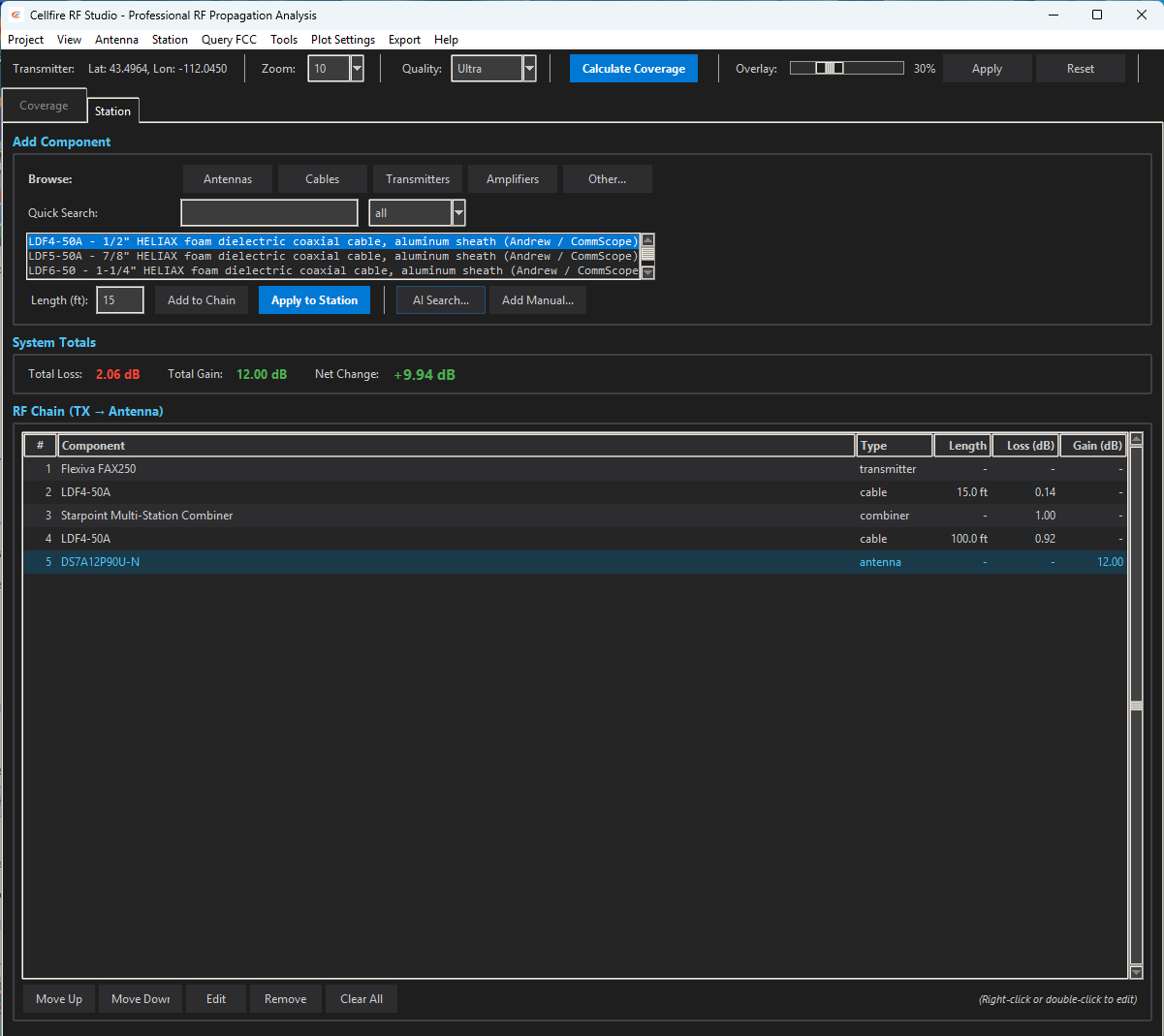
Build your complete RF chain.
Model your entire transmitter system — from transmitter output through every cable, connector, filter, and antenna — with real manufacturer specifications.
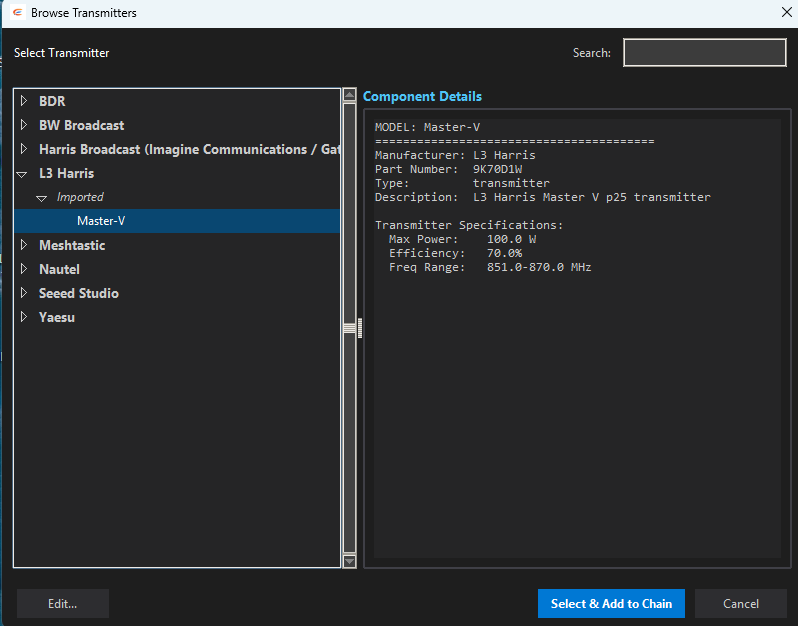
Real Manufacturer Catalogs
Pre-loaded with actual specifications from the equipment you already use in the field — browse by manufacturer and click to add directly to your RF chain.
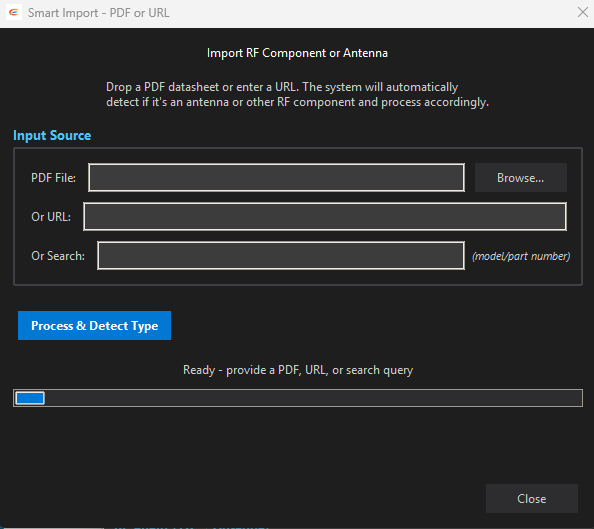
Drop in any datasheet.
AI does the rest.
No other RF planning software does this. RF Studio runs a local Ollama AI model that reads any manufacturer PDF — spec sheets, datasheets, install guides — and automatically extracts and creates the component file. No formatting required. No waiting on an engineer to e-mail you the right file. No hunting through databases hoping your exact model is listed.
Real-time FCC lookups. Inside the app.
RF Studio queries the FCC broadcast database directly. Search by coordinates and frequency to pull existing station data, find co-channel and adjacent-channel stations, and import facility information into your project without leaving the app.
- Search FCC database by coordinates + frequency
- Automatic service type detection (FM, AM, TV, LoRa, LTE)
- Retrieve existing station facility data and callsigns
- View co-channel and adjacent-channel competition
- FCC filing data flows directly into PDF reports
- HAAT & field strength compliance (dBu/dBμV/m)
From analysis to deliverable.
Generate professional reports and export data in the formats your clients, regulators, and teammates need.
PDF Reports
Publication-ready technical reports with embedded multi-zoom coverage maps, RF chain specifications, FCC filing data, terrain profiles, and coverage statistics. Ready for regulatory submission.
KML / Google Earth
Export coverage contours and transmitter placemarks as KML files. Drop directly into Google Earth, ArcGIS, or any GIS tool for further spatial analysis or client presentations.
Coverage Map Images
Export high-resolution coverage map images at multiple zoom levels (9–13) as JPEG files. Terrain-aware heatmaps overlaid on satellite imagery — ready for reports or client presentations.
One tool. Every radio technology.
RF Studio speaks the same frequency language you do — whether you're planning a broadcast transmitter, a P25 public safety network, a Meshtastic mesh, or a HAM repeater site.
FM Broadcast
FCC-compliant contour planning, HAAT calculation, co-channel and adjacent-channel analysis. Generate full technical showings ready for filing.
AM Broadcast
Ground-wave and sky-wave propagation modeling for AM stations. Interference analysis for day/night patterns and directional antenna arrays.
TV / DTV
Digital television coverage planning across VHF low, VHF high, and UHF bands. F(50,90) contour analysis and interference calculations per FCC rules.
P25 / Public Safety
Plan P25 trunked and conventional radio coverage for first responder networks. Validate repeater site placement, portable-to-portable coverage, and in-building signal penetration estimates.
Amateur Radio
Site-plan repeaters, link systems, and simplex coverage areas across any amateur band. HAAT analysis for license applications. Path analysis for linked repeater systems and EmComm nets.
Meshtastic / LoRa
Model LoRa propagation for Meshtastic mesh networks and LoRaWAN gateway placement. Terrain-aware path analysis to predict node-to-node link viability before you deploy hardware.
LTE / Cellular
Site selection and coverage modeling for private LTE, CBRS, and macro cellular deployments. Identify dead zones, predict handoff boundaries, and validate link budgets before tower construction.
Emergency Communications
Verify coverage for critical infrastructure before deployment. Terrain-aware analysis shows exactly where dead zones will be — so responders aren't the ones who find out the hard way.
Built for every kind of RF professional
You're applying for a construction permit, modifying an existing license, or running an interference study. RF Studio gives you ITM-modeled contours, FCC HAAT calculations, and PDF technical showings — all in one workflow.
- Pull co-channel and adjacent-channel station data directly from the FCC database
- Build your complete RF chain — transmitter, combiners, transmission line, antenna — with real manufacturer specs
- Generate coverage contours at every zoom level and export to PDF, ready for FCC filing
- Export KML for client presentations in Google Earth
You're picking a repeater site, planning a linked system, or verifying coverage for your ARES net. RF Studio lets you model real terrain between sites — not circles on a map — and back it up with documented analysis.
- Model repeater coverage across realistic terrain with ITM — see actual shadow zones
- Run path analysis between linked sites to verify link viability before climbing a tower
- Calculate HAAT per FCC rules for license applications
- Document your system RF chain for club records and trustee filings
You're standing up a community Meshtastic mesh and want to know if your gateway on the water tower actually reaches the valley. RF Studio tells you — with terrain elevation, Fresnel zone analysis, and the actual signal levels to expect.
- Model 915 MHz / 433 MHz LoRa propagation with terrain-aware ITM
- Run node-to-node path analysis with Fresnel zone clearance checks
- Optimize gateway placement before you haul hardware up a mountain
- Generate coverage maps to share with the community and coordinate mesh expansion
You're managing a P25 trunked system, a multi-site conventional network, or a critical LMR deployment. RF Studio documents your infrastructure, models coverage, and gives you the analysis to justify system changes to decision-makers.
- Model multi-site coverage and identify gaps in portable-to-portable coverage
- Document the RF chain of every site in your system with real specs
- Run interference studies when new sites are proposed near your infrastructure
- Generate PDF site documentation for your operations center
You paid for coverage. Now verify it. RF Studio lets you model what your system should be producing — and compare it against what you're actually getting in the field. Use it to hold vendors accountable and plan intelligent expansion.
- Model your existing system's designed coverage footprint
- Compare design models against Cellfire App drive test measurements
- Identify whether coverage gaps are RF issues or equipment failures
- Build the technical case for new infrastructure with documentation
You're verifying that a newly deployed system performs to spec. RF Studio is your baseline — the model your field measurements should match. When they don't, you have the analysis to pinpoint exactly where the system falls short.
- Generate the predicted coverage model as the QA benchmark
- Pair with Cellfire App for GPS-stamped field measurements
- Compare predicted vs. measured signal levels at each test point
- Deliver a complete technical report — model, measurements, and delta — to the client
System Requirements
RF Studio includes a built-in auto-updater — it checks for new releases at launch and installs them silently in the background.
Windows
| OS | Windows 10 / 11 (64-bit) |
| RAM | 8 GB minimum, 16 GB recommended |
| Storage | 2 GB + terrain tile cache |
| Internet | Required for FCC lookups & initial terrain download |
macOS
| OS | macOS 12 Monterey or later |
| RAM | 8 GB minimum, 16 GB recommended |
| Storage | 2 GB + terrain tile cache |
| Chip | Intel x64 or Apple Silicon (M1/M2/M3) |
Stop guessing. Start modeling.
RF Studio is included in Professional and Enterprise plans. Download and start your first coverage map today.